Configuring your SOLIDWORKS PDM Bill Of Materials layout
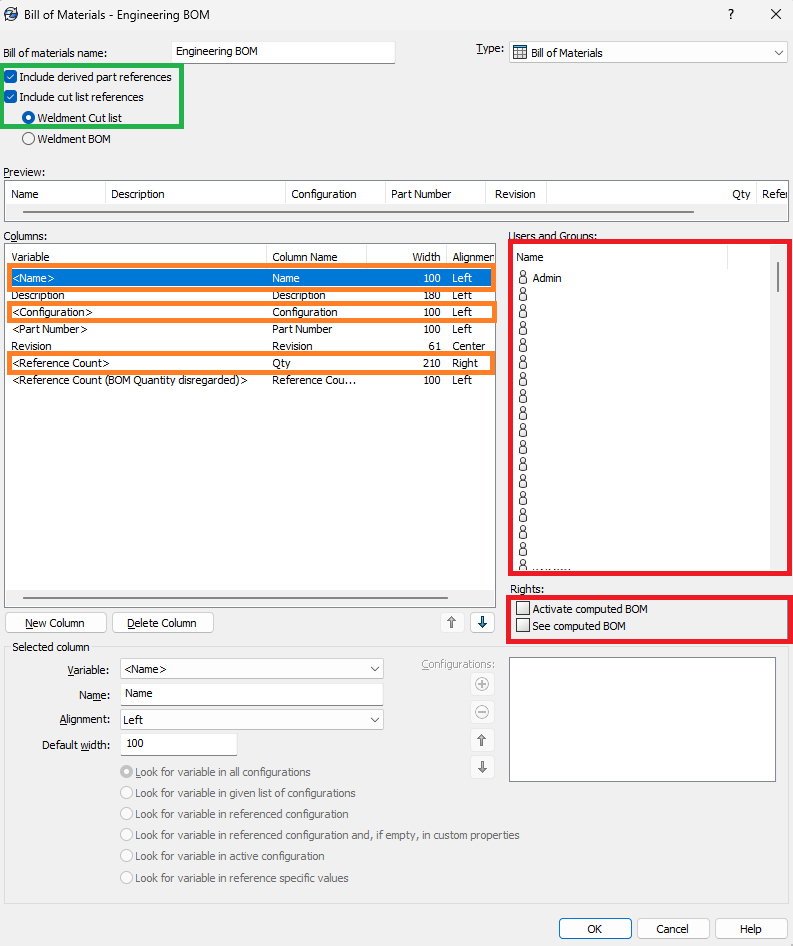
To ensure full compatibility with PDM2Excel, your Bill Of Materials layout in SOLIDWORKS PDM must include the following columns (highlighted in orange):
<Configuration>: Special column for the configuration name<Reference Count>: Special column for quantity<Name>: Special column for the item name
These columns are required. If any are missing, the export may fail or generate incomplete or inaccurate data.
Note
If you do not want these columns in your final Bill Of Materials, you can hide them by specifying the column names in the Omit Columns field in the Options page. Example: #;Name;Description will the columbs with headers #, Name and Description.
Supporting Cut Lists
If you want to include weldments and their cut list items in your exported BOM.
Enable "Include cut list references"
In the PDM Administration Tool, go to the BOM layout settings and check the option "Include cut list references" and "Weldment Cut list" (highlighted in green). This will allow cut list items from weldments to be included in the output.
SOLIDWORKS PDM Permissions
Activate Permissions (highlighted in red): Ensure that the relevant users or groups have the permissions:
- "Activated computed BOM"
- "See computed BOM"
Without these permissions, users will not be able to see or export the correct BOM layout.