
SQL Query Placeholders
Use an SQL query placeholder when annotation text must come from a SQL database. PDMPublisher replaces the file placeholder in the query, runs the query, and uses the returned value in the annotation.
Note
SQL query placeholders are available in both the PDM task and SOLIDWORKS add-in. The placeholder is evaluated for the file currently being processed by that product.
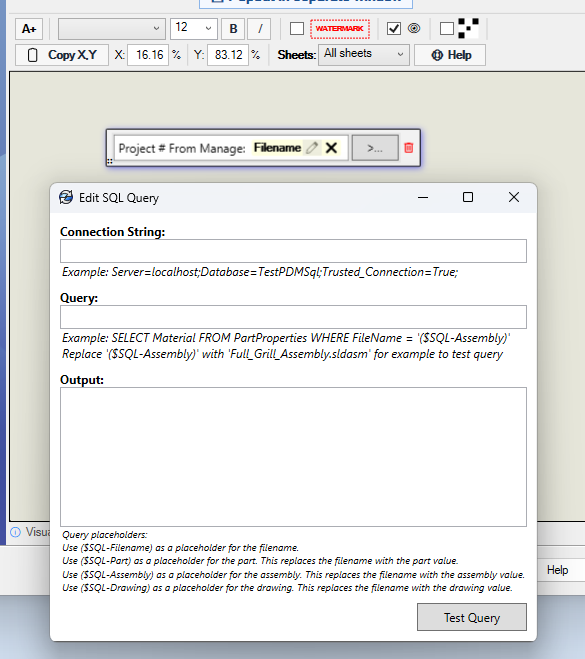
Configure the Query
- Add or select the annotation.
- Add an SQL value to the annotation, then select the pencil icon to open Edit SQL Query.
- Enter the SQL Server connection string.
- Enter a query that includes the placeholder for the file type you need.
- Select Test Query and confirm that the expected value appears under Output.
For example, a Windows-authenticated connection string can look like this:
Server=localhost;Database=TestPDMSql;Trusted_Connection=True;
Available Placeholders
| Placeholder | Value used in the query |
|---|---|
($SQL-Filename) |
The filename being processed. |
($SQL-Part) |
The filename changed to the .sldprt extension. |
($SQL-Assembly) |
The filename changed to the .sldasm extension. |
($SQL-Drawing) |
The filename changed to the .slddrw extension. |
Choose the placeholder that matches the record stored in your database. For example, use ($SQL-Assembly) when the database row is identified by the assembly filename, even when the annotation is being added to an exported drawing.
Filename Example
The following query looks up a project number by the current filename:
SELECT ProjectNumber
FROM FileProperties
WHERE FileName = '($SQL-Filename)'
If the filename is Bracket.sldprt, PDMPublisher evaluates the query as:
SELECT ProjectNumber
FROM FileProperties
WHERE FileName = 'Bracket.sldprt'
Assembly Example
The following query looks up material using the assembly filename:
SELECT Material
FROM PartProperties
WHERE FileName = '($SQL-Assembly)'
When testing this query in the dialog, replace the placeholder with an actual assembly filename because the test does not have the file context supplied by a publish job. For example:
SELECT Material
FROM PartProperties
WHERE FileName = 'Full_Grill_Assembly.sldasm'
The Output area shows the test result. Confirm that the query returns the text you want displayed in the annotation before saving the task.
Warning
Use a database account with only the permissions required to read the annotation data. If the connection string contains credentials, restrict access to the PDM task definition or exported SOLIDWORKS add-in profile.