SOLIDWORKS PDM Professional task add-in
Automated publishing from your PDM vault
PDMPublisher turns SOLIDWORKS PDM Professional into a controlled publishing system for drawings, models, references, and release packages. Configure the task once, then let users, workflows, or scheduled jobs create consistent downstream deliverables from the vault.
It is built for teams that need repeatable exports without asking engineers to open files one by one. PDMPublisher can create PDFs, DXFs, STEP files, 3D PDFs, eDrawings files, images, and CAD interchange formats while applying the task rules your PDM administrator defines.
Best fit
Use PDMPublisher when publishing should run from SOLIDWORKS PDM Professional: selected vault files, workflow actions, scheduled items, or PDM task execution.
Different from the SOLIDWORKS add-in
This version stores its settings in a PDM task definition. If users need to publish the document currently open in SOLIDWORKS with reusable profiles, use PDMPublisher for SOLIDWORKS instead.
Feature highlights
Multi-format publishing
Create production-ready outputs including PDF, DXF, STEP, 3D PDF, eDrawings, image formats, and supported CAD interchange formats from one configured task.
Feature guideVault-aware automation
Use PDM variables, file cards, workflow context, PDM search, vault paths, permissions, and task logs as part of the publishing process.
Feature guidePolished PDF packages
Merge PDFs, add a table of contents, include bookmarks, control drawing sheets, and apply annotations, watermarks, QR codes, and BOM quantities.
Feature guide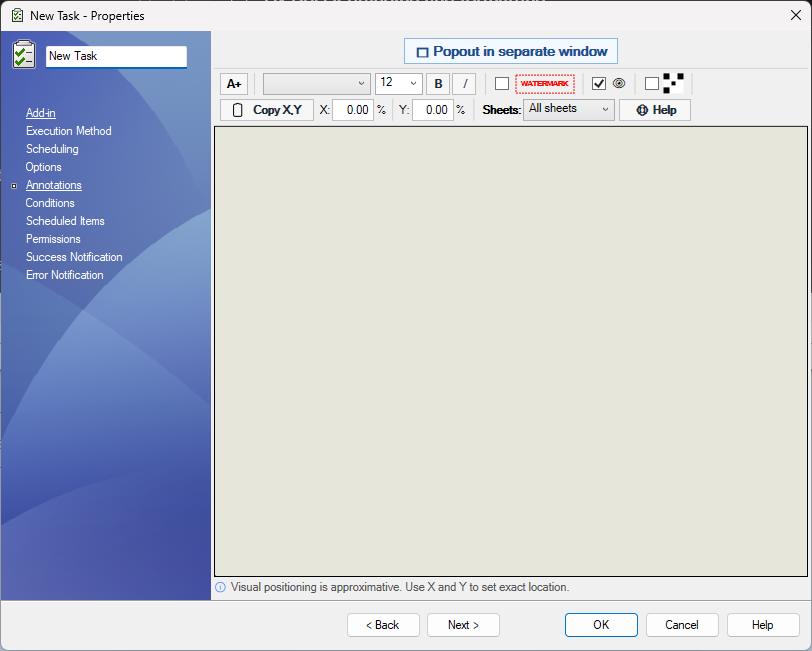
Annotate published outputs
Add data-card values, custom properties, QR codes, watermarks, and formatted text to exported drawings and PDFs.
Feature guide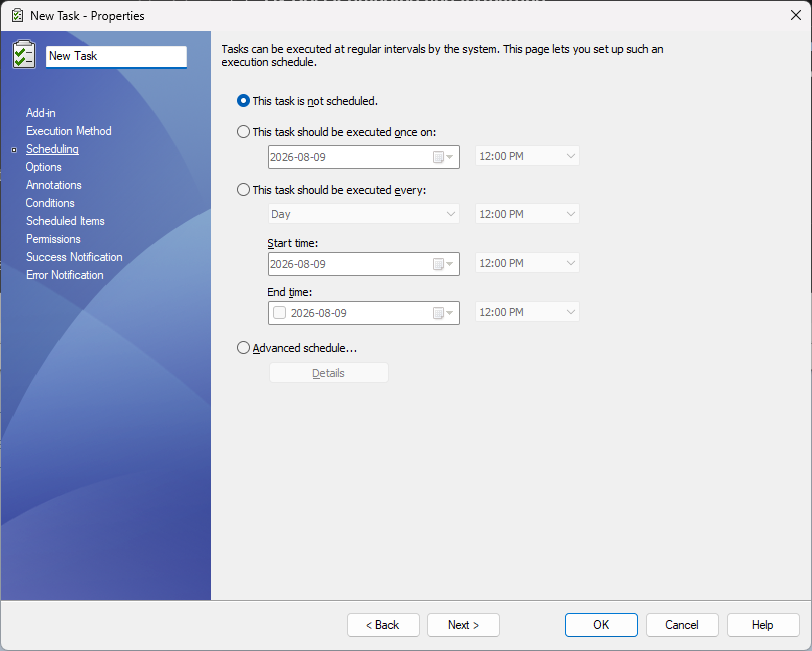
Run on your schedule
Use scheduled task items and repeatable task definitions for batch publishing, release archives, and routine vault output jobs.
Feature guideCapabilities included
PDM task setup
Create and configure a PDMPublisher task inside SOLIDWORKS PDM Administration for repeatable vault publishing.
Feature guideSelected or scheduled files
Run from selected vault files, scheduled task items, or launch-time file selection when users need to choose files at runtime.
Feature guideMany export formats
Create PDF, 3D PDF, DXF, DWG, STEP, IGES, STL, Parasolid, ACIS, eDrawings, images, and other supported outputs.
Feature guideVault and network destinations
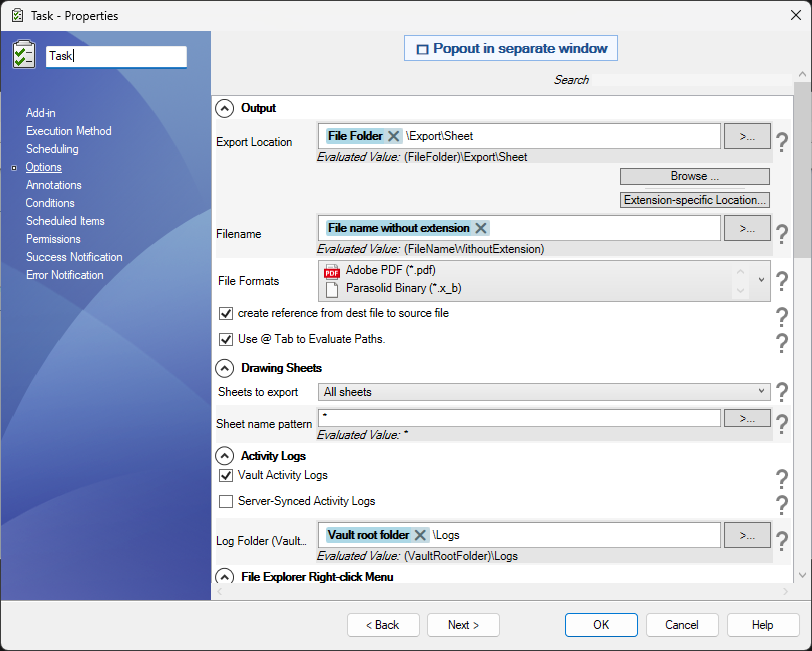
Publish to vault folders, relative paths, UNC locations, external folders, or extension-specific export destinations.
Feature guideControlled filename rules
Build output names from PDM variables, revisions, configurations, drawing sheets, dates, source names, and other placeholders.
Feature guideReference processing
Process assemblies and referenced components individually so release packages can include every required downstream file.
Feature guidePDM drawing search
Use vault search and where-used context to locate related drawings when models need associated drawing outputs.
Feature guideDrawing-derived BOMs
Use a named BOM saved on an assembly drawing to calculate references, configurations, and quantities for publishing.
Feature guideDrawing sheet control
Export all sheets or only matching sheets, then use sheet-name patterns to keep drawing deliverables clean.
Feature guideConfiguration export
Publish multiple part and assembly configurations, include configuration names, and filter which configurations are released.
Feature guideFlat-pattern DXF
Export sheet-metal flat patterns with manufacturing-friendly DXF settings, bend lines, sketches, and bounding boxes.
Feature guideSplit-body output
Support workflows that need separate deliverables for bodies, configurations, or derived model outputs.
Feature guideAnnotations and watermarks
Add fixed text, PDM variables, SOLIDWORKS properties, watermarks, QR codes, and formatted notes to published PDFs.
Feature guideConditional publishing
Use condition groups to decide which vault files and references are processed before the task creates outputs.
Feature guidePDF packages
Merge exported PDFs, add a table of contents, include bookmarks, and produce review-ready drawing packages.
Feature guideZIP archives
Package exported documents into a single ZIP for suppliers, manufacturing, customers, migration jobs, or release bundles.
Feature guideVault activity logs
Create detailed task logs in the vault so administrators can review successful exports, warnings, failures, and paths.
Feature guideServer-synced logs
Send activity logs to the server when support visibility and centralized troubleshooting records are needed.
Feature guideTask visibility control
Hide task commands from File Explorer when publishing should be launched only by administrators, workflows, or schedules.
Feature guideSOLIDWORKS version control
Choose which installed SOLIDWORKS version the PDM task host should use when publishing CAD files.
Feature guideTask details review
Review successful converted files and task details so vault users can understand what the task generated.
Feature guideUse it for
- Publish drawings, parts, assemblies, references, and supported Office documents from the vault.
- Create PDFs, DXFs, STEP files, 3D PDFs, eDrawings files, image formats, and CAD interchange outputs.
- Write exports to vault folders, network locations, relative folders, or extension-specific destinations.
- Merge exported PDFs, add a table of contents, include bookmarks, and control drawing sheet output.
- Add annotations, watermarks, QR codes, custom properties, data-card values, and BOM quantities to published PDFs.
- Use conditions, variables, PDM search, file naming rules, logging, and scheduled task items to standardize release workflows.
Why teams use it
Manual publishing is easy to start but difficult to keep consistent across a busy engineering group. File names drift, folders get missed, drawings are exported with different settings, and released deliverables may not match the source revision. PDMPublisher gives administrators a repeatable publishing layer that follows the way the vault is already organized.
That makes it useful for manufacturing handoffs, supplier packages, released drawing archives, migration cleanup, customer documentation, and other high-volume publishing workflows where consistency matters more than one-off flexibility.
Need interactive publishing from inside SOLIDWORKS instead? See PDMPublisher for SOLIDWORKS.