
Save As New
Save As New creates a separate native SOLIDWORKS document without renaming the source document or its referenced models. Open PDMPublisher > Settings > Save As New to configure the command.
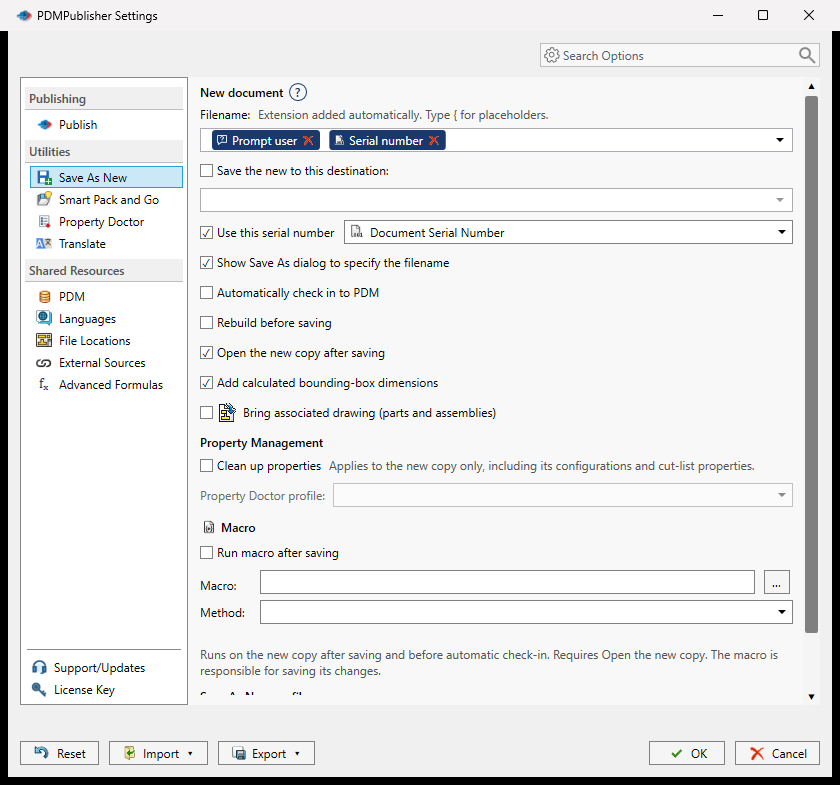
Configure the New File
- Enter a Filename template. The source extension is added automatically.
- Optionally enable Save the new to this destination and enter an existing folder or folder template.
- Enable Show Save As dialog when the user should confirm or change the target each time.
- Select any post-save options, then select OK.
- Open a document and select Save As New, or use the arrow beside the command to choose a saved profile.
Type { in a filename or destination editor to insert a document value, property, folder value, PDM value, or Prompt user token. A prompted value affects the output path only; it does not change document properties.
Options
| Option | Behavior |
|---|---|
| Use this serial number | Reserves a value from the selected PDM serial-number generator and makes it available to the name or destination template. |
| Automatically check in to PDM | Adds and checks in the saved model and associated drawing. The destination must be inside the selected vault. |
| Rebuild before saving | Rebuilds the active configuration, including assembly subassemblies, and stops if the rebuild fails. |
| Open the new copy after saving | Opens the saved copy and makes it the active document. |
| Add calculated bounding-box dimensions | Writes Bounding Box Length, Bounding Box Width, and Bounding Box Height in millimetres for the active configuration of a part or assembly. |
| Bring associated drawing | Copies an open or same-named drawing beside the new part or assembly and updates its model reference. |
| Run macro after saving | Runs the selected macro method on the new copy before automatic PDM check-in. The macro must save its own changes. |
Note
Property Doctor cleanup is visible in the current settings model but is not enabled for Save As New yet. Use Property Doctor separately until that automation is released.
Profiles
The Save As New profiles area stores reusable command configurations. Add or edit a profile in Settings, then use the arrow beside Save As New in the CommandManager to run it. The first profile is treated as the default.
Validation and File Safety
Save As New rejects an unchanged filename, an existing target file, a different SOLIDWORKS extension, an unavailable destination, and a filename already present in the selected vault. If the model is saved but a later macro or PDM check-in fails, the error explains that the new files already exist and must be inspected.