
Ask User to Select Configuration on Task Launch

Prompts the user to choose a configuration on task launch.
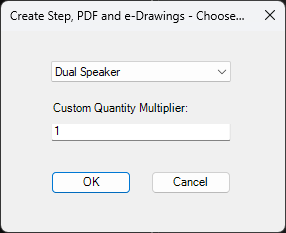
Use this for simple cases where the user only needs to choose a configuration and quantity multiplier on the machine that launched the task.
- Configuration selects which model configuration to export.
- The selected configuration is used for export, variable values, and file naming.
- Custom Quantity Multiplier multiplies the
(BOMQuantity)placeholder. - Example: if
(BOMQuantity)is2and the multiplier is3, the task uses6. - When activity tracking is enabled, the log notes that a custom quantity multiplier was used.
- Select
OKto continue orCancelto stop before publishing.
Note
Ask User to Specify Files on Task Launch overrides this option because it controls files, configurations, formats, and export location.