
Export Location

Sets the folder where PDMPublisher writes generated files. The export location can point to a folder inside the vault, a relative path, a UNC/server path, or a folder outside the vault.
Note
This setting is shared by the PDM task and SOLIDWORKS add-in. The PDM task can use vault placeholders and vault operations. The add-in evaluates the path from the document currently open in SOLIDWORKS and the selected profile.
Path Types
PDMPublisher accepts several path styles:
| Path type | Example | Use when |
|---|---|---|
| Vault path (PDM task) | (VaultRootFolder)\Released PDFs |
The exported files should be added back to the vault. Use the VaultRootFolder placeholder from the >... menu. |
| Relative path | Exports\PDF |
The destination should be based on the source file or current publishing context. |
| UNC/server path | \\server\engineering\exports |
The output should be written to a shared network location. |
| Outside the vault | D:\Exports\PDMPublisher |
The exported files should stay outside PDM. |
Important
If the location is inside the vault, the PDM task user or the user publishing from the add-in must have permission to create, check out, check in, and overwrite files in that folder.
If the export folder does not exist, PDMPublisher creates it before saving the exported file.
(VaultRootFolder) is the preferred way to build a vault path in the PDM task because it resolves to the local vault root on the task computer.
Browse Button
The browse button simply lets you select a static folder location and writes that folder path into Export Location.
Use it when the task should always export to the same fixed folder. If the path needs to change based on the file, revision, state, or folder, use placeholders from the >... menu instead.
Placeholders
The blue entries in the export location field are placeholders. A placeholder is a dynamic value that PDMPublisher resolves when publishing starts.
For example:
(TopAssemblyFolder)\Exports\(State)\(Revision)
If the top assembly is in:
C:\PDMVault\Projects\1001
and the file state is Released with revision B, PDMPublisher resolves the export location to:
C:\PDMVault\Projects\1001\Exports\Released\B
(TopAssemblyFolder) means the folder of the top-level file being processed. For the PDM task, that is the file that launched the task. For the SOLIDWORKS add-in, it is the document currently open in SOLIDWORKS. If the top-level file is a single part or drawing, PDMPublisher uses that file's folder.
For example, if the task is run on:
C:\PDMVault\Projects\1001\Bracket.SLDPRT
then:
(TopAssemblyFolder)\Exports
resolves to:
C:\PDMVault\Projects\1001\Exports
Placeholders are useful when the same task or add-in profile must write files to different folders depending on the file being processed. You can use values exposed by the >... menu, such as source folder, filename, configuration, or SOLIDWORKS custom properties. The PDM task can also expose vault values such as revision, state, workflow, and PDM variables.
Use the File Number and File Number Range placeholders to organize exports using the first numeric sequence in a source filename. You can extract its first 3, 4, 5, or 6 digits or create a range from that prefix. See File Number Placeholders for all available placeholders, examples, and fallback behavior.
Tip
Use placeholders for repeatable task setups and add-in profiles. Hard-coded paths are fine for one fixed export folder, but placeholders make the path adapt to each source file.
For the PDM task, if the path uses variables stored on the file's @ tab, see Use @ Tab to Evaluate Paths. This task-only option is not shown in the SOLIDWORKS add-in.
Extension-Specific Locations
Use Customize Location when different file formats need different output folders.
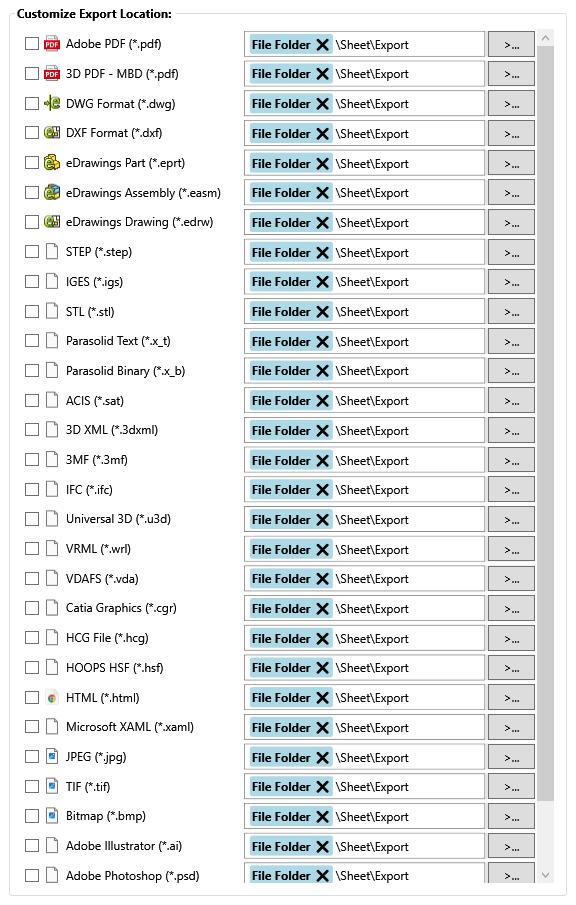
The dialog uses the same format names and file-type icons described on the File Formats page. Each row lets you enable a custom location for that output format.
When an extension-specific location is enabled for a file format, it overrides the main Export Location for that format only.
For example:
| Format | Main Export Location | Extension-specific location | Final output folder |
|---|---|---|---|
C:\PDMVault\Exports |
C:\PDMVault\Exports\PDF |
C:\PDMVault\Exports\PDF |
|
| DXF | C:\PDMVault\Exports |
\\server\laser\DXF |
\\server\laser\DXF |
| STEP | C:\PDMVault\Exports |
Not enabled | C:\PDMVault\Exports |
Only checked/enabled formats use their custom location. Any format without an extension-specific override continues to use the main Export Location.
Note
The PDM task activity log and the SOLIDWORKS add-in Logs tab identify customized paths used by extension-specific locations.
Warning
Do not end the export location or extension-specific location with a trailing backslash.