
Settings
Open PDMPublisher > Settings to configure the SOLIDWORKS add-in. Search Options finds settings by page name, label, and related keyword.
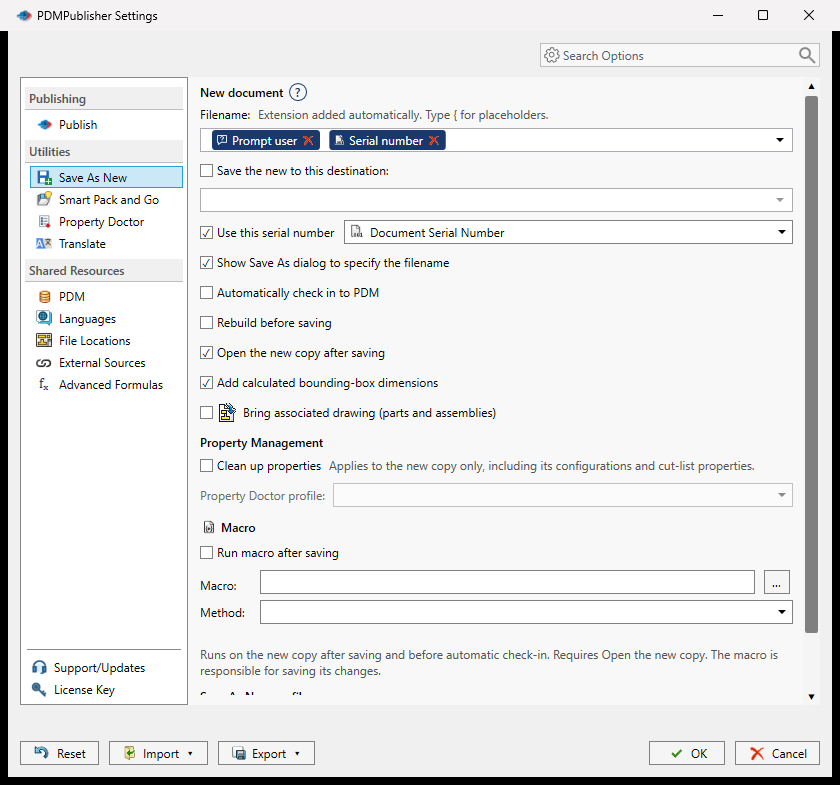
Settings Pages
| Category | Page | What it controls |
|---|---|---|
| Utilities | Save As New | Filename and destination templates, PDM serial numbers, associated drawings, bounding-box properties, macros, and command profiles. |
| Utilities | Smart Pack and Go | Pack profiles, PDM serial-number source, latest-revision behavior, companion files, ZIP output, and optional Property Doctor processing. |
| Utilities | Property Doctor | Default columns, thumbnail loading, and property-action profiles. |
| Utilities | Translate | Placeholder for a future feature. |
| Shared Resources | PDM | The vault used by PDM-aware utility settings. |
| Shared Resources | Languages | The PDMPublisher interface language. |
| Shared Resources | File Locations | Additional drawing folders, optional subfolders, and SOLIDWORKS Referenced Documents folders. |
| Shared Resources | External Sources | Reusable SQL Server sources used by supported property and formula menus. |
| Shared Resources | Advanced Formulas | Named formulas shared by filenames, folders, and properties. |
| Publishing | Publish | Publish profiles, output, formats, references, drawing sheets, PDFs, and manufacturing output. |
| Support | About | Support, documentation, product, and legal links. |
| Support | License | License activation and deactivation. |
Select OK to save changes. Cancel closes the dialog without saving the current edits. Reset restores defaults for the selected page; select OK to keep the reset values.
Transfer All Settings
The Import and Export menus at the bottom transfer a complete PDMPublisher configuration.
- Export all settings to File... creates a complete settings bundle.
- Share complete settings using PIN... uploads the bundle and returns a six-digit PIN.
- Import all settings from File... validates and applies a bundle from disk.
- Import complete settings using PIN... downloads, validates, and applies a shared bundle.
A complete bundle contains utility settings, Save As New profiles, Property Doctor profiles, Smart Pack and Go profiles, shared formulas and sources, and complete Publish profiles.
Important
SQL Server connection secrets are not exported or uploaded. After an import, re-enter credentials for external sources that do not already have matching local credentials.
Before replacing settings, PDMPublisher validates every section and creates a timestamped local backup. If writing a section fails, it attempts to restore the previous settings.
For transferring only one Publish profile, use Profiles instead of a complete settings bundle.